How GPS Pins Help You Remember Productive Sites
Your memory loses your best detecting spots. Here is how GPS pins help you revisit productive ground — without exposing your sites to anyone else.
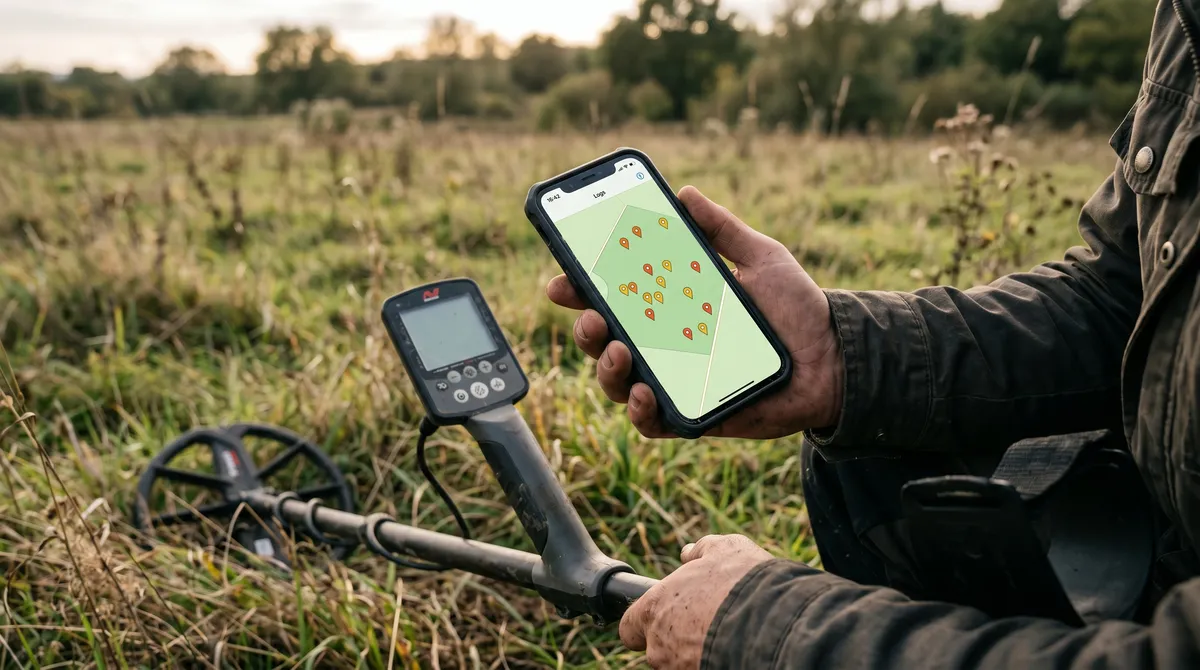
You find a great patch — three coins in a ten-metre stretch — and you swear you’ll remember exactly where it was. Then life happens, a few weeks pass, and you’re standing in the same field with no idea which corner produced. It’s one of the most common frustrations in detecting, and it’s completely avoidable.
A GPS pin fixes it. Here’s how to use pins well, and how to keep them private.
Memory is the problem. Pins are the fix.
Your brain is bad at storing locations. It remembers “near the big tree” and loses the other forty metres of detail. A site that gave up good finds deserves better than a vague mental note.
Dropping a GPS pin the moment you find something means you can return to the exact spot — not the general area. That matters more than it sounds, because productive ground is almost never the whole field. It’s a hot corner, an old path, the lip of a slope. Pin it and you can work it methodically next time instead of re-searching from scratch.
Pin the right things
Not every pin means the same thing. It helps to think in three layers:
- Find locations — the precise spot a target came out. These build a map of where the good stuff actually is.
- Hunt areas — the broader zone you covered that day, so you know what ground you’ve already worked.
- Future intent — spots you spotted but didn’t get to, or areas worth a return visit.
Keeping these distinct stops you re-walking ground you’ve already cleared and points you straight at the unfinished promising patches.
How pins make you more efficient
Over a season, your pins turn into a coverage map. You can see at a glance which parts of a permission you’ve hammered and which you’ve barely touched. That’s the difference between wandering and working a site — fewer wasted swings, more time over ground that’s actually producing.
Tie those pins to your finds and you get even more: the productive zones light up as clusters, and your stats can rank locations by keeper rate. Your logbook becomes a strategy map.
Keep your spots private
Here’s the part too many detectorists get wrong: a precise location is sensitive information. Post a productive coordinate publicly and you can expose a site, breach a landowner’s trust, and invite others onto ground that isn’t theirs to search.
So treat pins as private by default. In DetectingLog, your locations stay on your device unless you choose to enable cloud sync, and even then they’re protected so only your account can read them. There’s no public feed, no sharing your spots by accident. If you ever do share, share a general area — never the exact pin. We go deeper on this in the privacy guide.
Open the spot when you need it
A saved pin isn’t much use if you can’t get back to it. The practical workflow is simple: save the location in the field, then when you’re planning a return, open it in your phone’s maps to navigate straight there. No landmarks, no guesswork, no “I think it was over here.”
The bottom line
Your best sites are worth protecting and worth returning to. GPS pins let you do both — capture the exact spot, keep it private, and walk straight back to productive ground on your next hunt.
Frequently asked questions
Why use GPS pins for metal detecting?
Because memory fails. A productive patch is usually one small corner of a larger site, and weeks later you won't recall exactly where. A GPS pin takes you back to the precise spot so you can work it properly instead of guessing.
Are my saved detecting locations private?
In DetectingLog they are. Your pins stay on your device by default and are never shared or made public. Cloud sync is optional and protected so only your account can read your locations. Your spots stay yours.
Should I share my metal detecting GPS coordinates?
Generally no. Exact coordinates of a productive private site can expose it to others, breach a landowner's trust, or put finds at risk. Keep precise pins to yourself and only ever share a general area if you choose to share at all.
Keep reading
Metal Detecting Data: Spot Patterns Across Your Hunts
Finds per hunt, keeper rate, top locations, VDI distribution, depth bands — here is how simple stats reveal patterns your memory would miss.
Private by Default: Be Careful Sharing Detecting Locations
Why detectorists should keep their sites private — landowner trust, site preservation, theft risk — and how local-first logging protects your spots.